TL;DR

Get business pricing on garage and car supplies
- Business-only prices and quantity discounts
- Tax-exempt purchasing
- Multiple users, one account, clear invoices
Car diagnostic scan tools connect to your vehicle’s onboard system to read trouble codes and data. They vary from simple code readers to advanced professional scanners, so picking the right one depends on your needs and vehicle compatibility.
Imagine you’re driving home when the check-engine light flickers on. Instantly, your mind races — is it just a minor glitch or a sign of something serious? That’s where car diagnostic scan tools come into play.
These devices act as your vehicle’s translator, connecting to its onboard system and revealing the hidden clues behind warning lights or strange behaviors. Whether you’re a DIY enthusiast or a professional mechanic, understanding what these tools can do—and what they can’t—can save you time, money, and headaches.
Choose a scanner that matches your vehicle’s year, make, and model to avoid compatibility issues.
Basic code readers are perfect for quick checks, but if you want to access multiple modules or run active tests, invest in a more advanced tool.
Wireless adapters and smartphone apps make diagnostics easier but verify their support for your vehicle and keep security in mind.
Updates and subscriptions can add costs over time—review what’s included before purchasing an expensive scanner.
High-voltage electric vehicles require specialized tools and training; don’t rely on generic OBD-II devices for EV diagnostics.
What Exactly Does a Car Diagnostic Scan Tool Do?
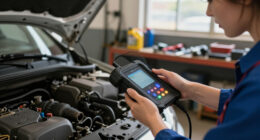
At its core, a car diagnostic scan tool is a device that connects to your car’s OBD-II port, typically located under the dashboard. It retrieves diagnostic trouble codes (DTCs), which are like digital clues pointing toward potential issues.
For example, if your engine warning light glows, plugging in a scan tool can reveal a code like P0130 — indicating a problem with the oxygen sensor. But that code is just a clue, not a diagnosis. It’s similar to seeing a fever and knowing you’re sick, but not knowing whether it’s the flu, a cold, or something more serious.
Some tools go beyond basic codes. They offer real-time data—like engine RPM, coolant temperature, or throttle position. This live feed helps you see exactly what’s happening under the hood at that moment, making it easier to pinpoint issues.
Understanding these outputs is crucial because not all codes are equally serious, and some may require immediate attention, while others are benign. The way you interpret this data influences your decision to repair, seek professional help, or monitor further.
As an affiliate, we earn on qualifying purchases.
Different Types of Car Diagnostic Scan Tools—What’s Right for You?
Not all scan tools are created equal. Choosing the right one depends on your needs, budget, and how deep you want to go. Here’s a quick rundown:
- Basic code readers: Small, cheap, and simple. They read and clear engine or emissions codes. Perfect for quick checks and DIY fixes. However, their simplicity means they often lack detailed data or support for other systems, which can limit diagnosing complex issues.
- Bluetooth or Wi-Fi adapters with smartphone apps: Plug into the OBD-II port, connect via your phone, and see data on a sleek app. They offer convenience and portability, but their effectiveness depends on app quality and compatibility. The tradeoff is that they might not support advanced features like live data logging or system-specific functions.
- Enhanced consumer scanners: Support more modules, provide live data, and run active tests. They strike a balance between affordability and capability, making them suitable for hobbyists who want more insight without the expense of professional tools. They often support multiple systems, but their depth is still limited compared to full professional scanners.
- Professional diagnostic scanners: Offer full system access — ABS, airbags, transmission — plus coding and bidirectional testing. Designed for repair shops and serious mechanics, these tools provide comprehensive diagnostics but come with higher costs and a steeper learning curve. They enable advanced troubleshooting and system programming, which can be invaluable for complex repairs but may be overkill for casual users.
Choosing the right type involves understanding what depth of diagnosis you need, the systems in your vehicle, and how much you’re willing to invest. The right balance ensures you get meaningful insights without unnecessary expense or complexity.
As an affiliate, we earn on qualifying purchases.
What’s Changing in the Car Diagnostic World?
The market isn’t standing still. Today, wireless, phone-connected tools are booming. They make basic scans accessible with a tap, turning your phone into a mini mechanic. But with more options come new questions: compatibility, data security, and updates.
Meanwhile, support for more vehicle systems grows. Some scanners now tap into brakes, airbags, and body modules—though support varies by make and model. For example, a scanner might read engine codes on most cars but can’t access airbags in a BMW without special permissions. This expansion means users can diagnose more issues remotely, but it also raises concerns about data privacy and security, especially with cloud-based updates and storage.
Bidirectional testing is another trend. Imagine commanding your vehicle’s electronic parking brake or recalibrating the steering angle—all from your scanner. While this feature offers powerful control, it also introduces risks if used improperly, as incorrect commands can affect vehicle safety or operation. Manufacturers often restrict certain functions to prevent misuse, but understanding these capabilities is essential for safe diagnostics.
Software updates and subscriptions also shape the scene. Many advanced tools require ongoing fees to access new vehicle data or features. This ongoing cost can accumulate, making some devices more expensive over time. Buyers should evaluate whether the long-term benefits justify these costs, especially if they plan frequent diagnostics.
Lastly, high-voltage systems in hybrids and EVs demand specialized tools and training. Regular OBD-II readers aren’t enough to diagnose battery or power-electronic issues safely and accurately. This shift emphasizes the need for professional-grade equipment and knowledge, highlighting a significant evolution in vehicle complexity and the skills required to maintain them.
As an affiliate, we earn on qualifying purchases.
How to Choose the Perfect Scan Tool for Your Needs
Picking the right diagnostic tool starts with asking what you really need. Do you just want to clear a check engine light now and then? Or do you plan to work on multiple systems regularly? Here’s a step-by-step approach:
- Check vehicle compatibility: Confirm the tool supports your car’s year, make, and model. For example, some basic readers won’t support newer hybrids or EVs, which could leave you unable to diagnose key issues or reset systems.
- Identify needed functions: Do you want live data, module access, or active testing? Basic tools might only read codes, but if you’re fixing ABS or airbags, look for more advanced features. Missing these can lead to incomplete diagnostics, potentially causing misdiagnosis or unnecessary repairs.
- Compare update policies: Does the device require subscriptions? Are updates free or paid? Regular updates ensure compatibility with newer vehicles and fix bugs, but ongoing costs can add up. Weigh these expenses against the benefits of having the latest data access.
- Read reviews and support options: Look for trusted brands and good customer support. A well-supported device reduces frustration and ensures you can troubleshoot issues or get firmware updates when needed, extending its useful life.
- Set a budget: Decide how much you’re willing to spend. Basic readers cost less than $50, suitable for occasional use, while professional tools can cost thousands but provide comprehensive diagnostics. Aligning cost with your needs prevents overspending or under-equipping your vehicle.
Following these steps helps you select a scanner that not only fits your current needs but also adapts to future requirements, saving money and reducing diagnostic errors.
car diagnostic tool for DIY mechanics
As an affiliate, we earn on qualifying purchases.
As an affiliate, we earn on qualifying purchases.
Common Questions About Car Diagnostic Scanners
Many people wonder about the limits and capabilities of these tools. Here are some typical questions and their deeper implications:
- What does an OBD-II scanner do? It reads and clears codes from your vehicle’s computer, providing crucial clues about what’s wrong. This process helps in early detection, potentially preventing further damage, but it’s only a starting point. Without proper interpretation, you might misdiagnose issues, leading to unnecessary repairs or missed problems.
- Can a scanner tell me which part is bad? Not directly. It points to symptoms or faults, but testing is needed to identify the exact failed component. Relying solely on codes without further testing can result in replacing parts unnecessarily or overlooking root causes, so understanding this limitation is key to effective repairs.
- Will any scanner work with my car? Not always. Basic codes are universal, but advanced functions depend on compatibility. For example, some vehicles require manufacturer-specific protocols. Always verify compatibility to avoid buying a device that can’t access vital systems, which could lead to incomplete diagnostics.
- Can I turn off the check-engine light? Yes, many scanners can clear codes, but if the underlying problem isn’t fixed, the light will return. This can mask ongoing issues, potentially leading to more severe damage or failing emissions tests. Proper diagnosis and repair are essential before simply resetting the warning.
- Do ABS or airbag warnings show up on all scanners? Only if the device supports those systems. Basic readers usually don’t, which means they can miss critical safety alerts. Advanced scanners that support these modules provide a more comprehensive safety check, but they come at a higher cost and complexity. Understanding your vehicle’s systems helps you choose the right tool for safety diagnostics.
Conclusion
In the end, a good car diagnostic scan tool is like having a skilled mechanic in your pocket—ready to reveal what’s wrong and guide you toward fixing it. But not all tools are equal. Picking one tailored to your vehicle and needs saves money, frustration, and time.
When in doubt, stick to trusted brands, check compatibility carefully, and remember: a code is just a clue. The real fix often starts with understanding what those numbers mean and how to act on them. Your car’s health depends on it—so choose wisely and keep your vehicle running smoothly.
Fall Picks
fall essentials
As an affiliate, we earn on qualifying purchases.