If your DEWALT 20V MAX battery isn’t charging, it can halt your work progress. Fortunately, most issues are simple to diagnose and fix with the right steps. This guide will walk you through common causes and safe troubleshooting techniques to get your tools back in action quickly.

Get garage and car supplies delivered free — and shop member deals
- Fast, free delivery on millions of items
- Access to Prime Big Deal Days deals on October 6–7
- Prime Video, Amazon Music and more included
Before starting, ensure you’re working in a safe environment and wearing appropriate safety gear. Always disconnect the battery from the charger before inspecting or handling.
Key Takeaways
| Battery connection | Ensure the battery and charger contacts are clean and properly seated. |
| Charger status | Check LED indicators on the charger for error signals or status. |
| Power source | Verify the outlet or power strip is working correctly. |
| Battery health | Older or damaged batteries may no longer hold a charge. |
| Overheating | Allow the battery and charger to cool down if they feel hot. |
Step 1: Inspect the Battery and Charger Contacts
- Remove the battery from the charger and the tool.
- Wipe both the battery terminals and charger contacts with a clean, dry cloth to remove dust, dirt, or corrosion.
- Check for any visible damage or corrosion on the contacts.
Step 2: Confirm Power Source Functionality
- Plug the charger into a known working outlet.
- Test the outlet with another device to ensure it’s supplying power.
- If using a power strip, try connecting directly to the wall socket.
Step 3: Properly Insert the Battery
- Align the battery with the charger slots, ensuring the contacts match up correctly.
- Push firmly until you hear a click or see the LED indicator light up.
Step 4: Check the Charger Indicators
- Observe the LED lights on the charger. A steady green usually indicates full charge or readiness.
- A flashing or red light may signal an error or that the battery is not charging properly.
- Consult the charger manual for specific indicator meanings.
Step 5: Test with a Known Good Battery
If available, try charging a different DEWALT 20V MAX battery. If this battery charges normally, your original battery may be faulty.
The Products in This Guide

DEWALT 20V MAX Cordless Drill Driver Set
- ✔ Weight: 2.0 lbs
- ✔ Chuck Size: 1/2 inch
- ✔ Speed: 2 speeds

DEWALT Drill Bit Set
- ✔ Size Range: from small to larger bits
- ✔ Durability: High Speed Steel
- ✔ Design: Split point for accuracy
DEWALT 20V MAX Cordless Drill Driver Set
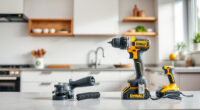
The DEWALT 20V MAX Cordless Drill Driver Set offers a powerful brushless motor and a compact design, making it a versatile choice for various tasks. Its battery and charger compatibility ensures convenient operation, but occasional charging issues can occur due to contact or power problems.
Pros:
- Brushless motor delivers more run time
- Compact and lightweight design
- LED light improves visibility
- Includes charger and 2.0 Ah battery
Cons:
- Battery may lose charge over time
- Potential contact corrosion
- Requires proper maintenance
Best for: General-purpose drilling, fastening, and DIY projects.
Not ideal for: Heavy-duty industrial applications or extended continuous use.
Bottom line: A dependable cordless drill for versatile tasks, with attention to proper charging and maintenance.
DEWALT Drill Bit Set
Complement your DEWALT drill with this durable 14-piece drill bit set featuring a 135-degree split point for precise drilling in plastic, wood, and metal. Its high-speed steel construction ensures durability and wear resistance.
Pros:
- Versatile for multiple materials
- High durability
- Easy size identification
- Rust-resistant coating
Cons:
- Limited to drill bits, not accessories
- Requires compatible chuck
- Set may be overkill for casual users
Best for: Professional and DIY drilling projects requiring reliable bits.
Not ideal for: Heavy industrial use or specialized drilling.
Bottom line: A versatile drill bit set that enhances the performance of your DEWALT drill.
Frequently Asked Questions
Why isn’t my DEWALT battery charging?
Possible causes include dirty or corroded contacts, faulty charger, power supply issues, or a damaged battery. Follow the troubleshooting steps to identify the specific issue.
How can I clean my battery contacts?
Use a dry, soft cloth or a small brush to gently clean the contacts. Avoid using liquids or abrasive materials to prevent damage.
My charger shows a red light, what does it mean?
A red light typically indicates an error, overheating, or that the battery isn’t charging properly. Refer to the charger manual for specific indicator meanings.
How do I know if my battery needs replacement?
If your battery no longer holds a charge after multiple attempts, shows physical damage, or the charger indicates a fault, it may be time to replace it.
Keep Your DEWALT Power Tools Charging Smoothly
Regular maintenance of your batteries and chargers can prevent many charging issues. Always ensure contacts are clean, power sources are reliable, and batteries are within their usable lifespan. With proper care and troubleshooting, your DEWALT tools can stay powered and ready for any project.
Affiliate disclosure: As an Amazon Associate we earn from qualifying purchases. Prices and availability are accurate as of the time of publishing.
Halloween Picks
halloween
As an affiliate, we earn on qualifying purchases.