
If your Milwaukee power tool keeps stalling during operation, it can be frustrating and hamper your work. Many issues stem from battery problems, overheating, or internal faults. This guide provides practical, safe steps to diagnose and fix common causes of stalling, helping you get back to work quickly.
Listen free for 30 days with Audible
Thousands of audiobooks and originals — cancel anytime.
Start your free trialAs an affiliate, we earn on qualifying purchases.
Key Takeaways
| Check the battery | Ensure your batteries are fully charged and in good condition. |
| Inspect for overheating | Overheating can cause tools to stall; let the tool cool before troubleshooting. |
| Clean and maintain | Dirt or debris in vents or contacts can cause issues; keep your tools clean. |
| Examine internal components | Worn brushes or motor faults may need professional inspection. |
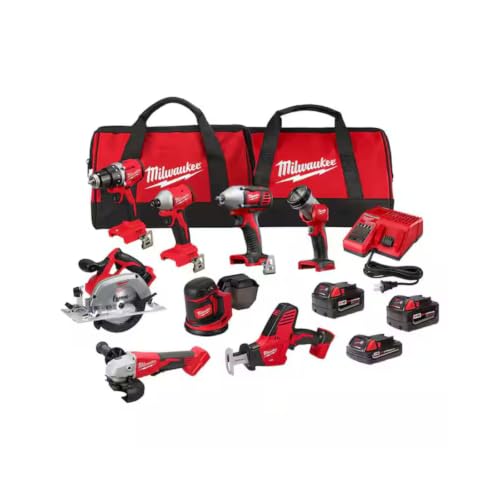
Milwaukee M18 18V Cordless Power Tool Combo Kit, 8-Tool Set, 3 Batteries, 2 Tool Bags, Charger Included
- Complete 8-Tool Set: Hammer drill, impact driver, saw, grinder, reciprocating saw, multi-tool, work light
- Includes 3 Batteries: Two high-capacity and one compact battery
- M18 Lithium-Ion System: Consistent power and extended runtime
As an affiliate, we earn on qualifying purchases.
Step 1: Verify Battery Condition
- Remove the battery from the tool.
- Check that the battery is charged using a compatible charger.
- If the battery is old or shows signs of damage, replace it with a new one, such as the Milwaukee 48-11-1850R 5.0 Ah XC Extended Capacity Resistant Battery.
- Reinsert the battery and test the tool.
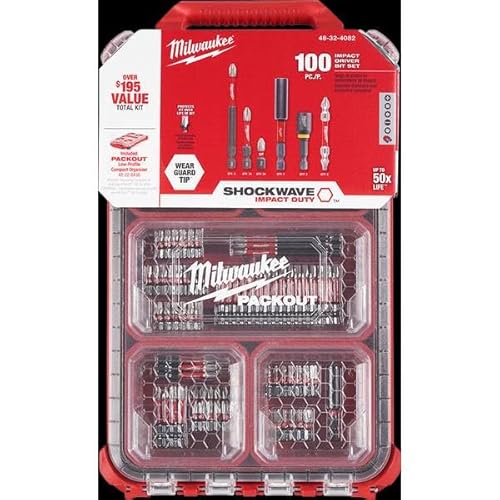
Milwaukee Shockwave 100pcs Impact Driver Bit Set Packout
As an affiliate, we earn on qualifying purchases.
Step 2: Allow the Tool to Cool Down
If the tool has been used intensively, it may overheat. Turn off the tool, disconnect the battery, and let it cool for at least 10-15 minutes before trying again. Overheating can trigger safety features that cause stalling.
Step 3: Clean Vents and Contacts
- Use compressed air to blow out dust from vents and motor areas.
- Inspect the contacts where the battery connects; clean with a dry cloth if dirty or corroded.
Step 4: Check Internal Components
For experienced users, open the tool casing carefully to inspect brushes, wiring, and motor parts. Worn brushes or loose connections can cause stalling. If unsure, consult a professional technician.
Step 5: Test and Confirm
Reassemble the tool, insert a fresh or fully charged battery, and run a test. If the tool still stalls, consider replacing internal parts or consulting Milwaukee customer service.
The Products in This Guide

Milwaukee M18 18V Cordless Power Tool Combo Kit
- ✔ Voltage: 18V
- ✔ Battery Type: Lithium-ion
- ✔ Number of Tools: 8

Milwaukee Shockwave 100pcs Impact Driver Bit Set Packout
- ✔ Number of bits: 100
- ✔ Material: Impact rated steel
- ✔ Case: Packout
Milwaukee M18 18V Cordless Power Tool Combo Kit
The Milwaukee M18 18V Cordless Power Tool Combo Kit is an excellent choice for demanding jobs. Its robust design and powerful batteries help prevent stalling caused by power issues, making it a reliable option for professionals and serious DIYers.
Pros:
- Includes 8 versatile tools
- 3 batteries for extended runtime
- Durable and well-built
- Includes two heavy-duty contractor bags
Cons:
- Can be heavy for prolonged use
- Higher price point
- Battery charging times vary
Best for: Heavy-duty construction, remodeling, and maintenance tasks.
Not ideal for: Light or occasional DIY projects where portability is prioritized.
Bottom line: A comprehensive kit designed for high performance and durability.
Milwaukee Shockwave 100pcs Impact Driver Bit Set Packout
Pair your Milwaukee tools with the Shockwave 100pcs Impact Driver Bit Set for maximum efficiency. Its impact-rated bits are durable and designed for heavy-duty tasks, reducing the chance of tool stalls caused by worn bits.
Pros:
- High impact durability
- Comprehensive set
- Includes storage case
- Compatible with all impact drivers
Cons:
- Bits may be overkill for light tasks
- Bulkier case
Best for: Heavy-duty driving and fastening tasks.
Not ideal for: Light screw driving or delicate work.
Bottom line: A must-have accessory to enhance your Milwaukee impact driver performance.
Frequently Asked Questions
Why does my Milwaukee tool keep stalling even with a new battery?
Possible causes include internal motor issues, overheating, dirty contacts, or worn brushes. Follow the troubleshooting steps to identify the specific problem.
Can I fix internal motor problems myself?
Internal motor repairs can be complex and may void warranties. It’s best to have a professional technician inspect or repair the tool if internal faults are suspected.
How often should I replace the brushes in my Milwaukee power tool?
Brush replacement depends on usage, but typically every few years or after 200-300 hours of operation, or when performance declines.
Is it safe to open my Milwaukee tool for troubleshooting?
Only attempt to open the tool if you’re experienced with electrical tools. Always disconnect the battery and work in a safe environment to avoid injury.
Get Your Milwaukee Power Tool Running Smoothly Again
With proper troubleshooting steps like checking the battery, allowing overheating to subside, cleaning contacts, and inspecting internal parts, you can often resolve stalling issues yourself. However, if problems persist, professional repair or replacing the tool might be the best course. Regular maintenance and using quality batteries, such as the Milwaukee XC or High Output packs, can help prevent future issues and keep your tools performing at their best.
Affiliate disclosure: As an Amazon Associate we earn from qualifying purchases. Prices and availability are accurate as of the time of publishing.
Grilling season Picks
grills
As an affiliate, we earn on qualifying purchases.