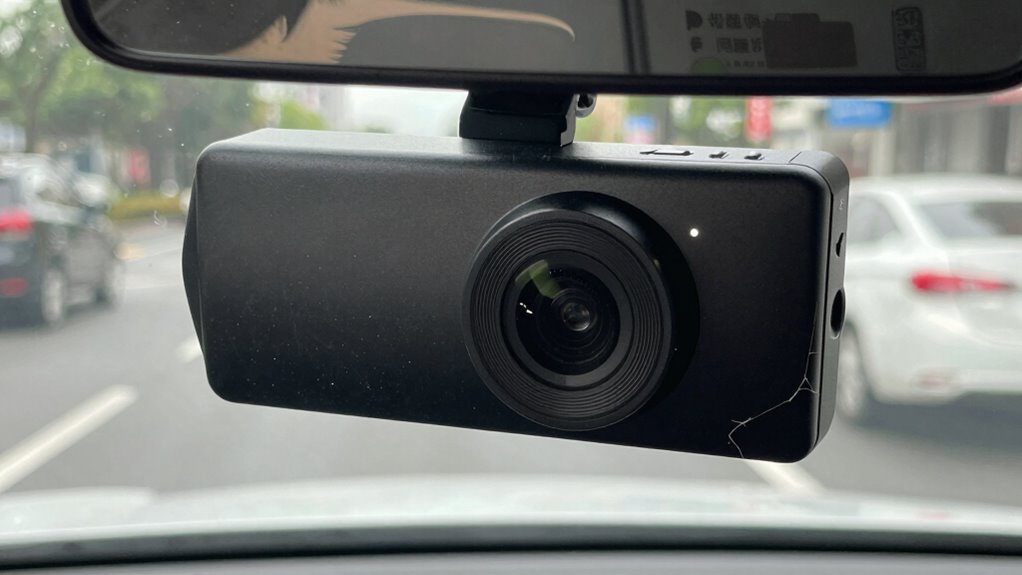

If your dash cam is quietly failing, you might notice inconsistent recordings with sudden stops, skipped footage, or unexpected gaps. Power connection issues, such as sudden resets or loose wiring, can also cause problems. Over time, hardware degradation or exposure to harsh conditions may lead to blurry footage or black screens. Regular maintenance, firmware updates, and proper placement help prevent failure. Keep an eye out for these signs to keep your device functioning smoothly, and there’s more to discover if you stay tuned.

Get business pricing on garage and car supplies
- Business-only prices and quantity discounts
- Tax-exempt purchasing
- Multiple users, one account, clear invoices
Key Takeaways
- Experience sudden stops or missing footage during critical moments, indicating potential device malfunction.
- Notice frequent glitches, black screens, or blurry images despite proper power supply.
- Find the device unresponsive or inconsistent after firmware updates or environmental exposure.
- Observe power connection issues like unexpected resets or loose wiring after vehicle movement.
- Detect signs of hardware degradation, such as poor image quality or physical damage from harsh conditions.

Your dash cam is an essential safeguard on the road, but like any electronic device, it can fail quietly over time. One of the first signs of trouble is inconsistent recording or sudden gaps in footage. If you notice that your dash cam suddenly stops recording during critical moments or skips sections, it’s likely a sign of underlying issues. Firmware updates are crucial for maintaining functionality and fixing bugs, so if your device isn’t running the latest version, it might be more prone to glitches. Skipping updates can cause the system to become unstable, so regularly check for firmware updates and install them promptly to guarantee smooth operation.
Regularly update your dash cam firmware to prevent glitches and ensure reliable recording.
Power connection issues are another common culprit behind dash cam failures. If your device suddenly powers off or resets without warning, it could be due to loose or faulty wiring. Check the power cable and connections to make sure they’re secure. Sometimes, the cable might be damaged or worn out, causing intermittent power loss. Even a small disconnection can result in the dash cam not recording when needed most. If you’ve recently moved or jostled the vehicle, it’s worth inspecting the power connection to rule out any loose or broken wires.
Over time, hardware components can degrade, especially if your dash cam is exposed to extreme temperatures or rough conditions. This degradation may manifest as blurry footage, poor image quality, or a black screen. If your footage looks grainy or the display fails to turn on despite power being supplied, hardware failure could be the cause. Regularly cleaning the lens and ensuring proper ventilation can help prolong your device’s lifespan, but if issues persist, it might be time to contemplate replacing the unit. According to the home appliances and tech reviews, environmental factors can significantly impact electronic device longevity. Additionally, exposure to extreme temperatures can accelerate hardware degradation, making it even more important to consider placement and storage conditions. Proper device placement can prevent unnecessary wear and tear, extending the lifespan of your dash cam. For instance, proper ventilation can help reduce overheating and protect internal components from damage.
As an affiliate, we earn on qualifying purchases.
Frequently Asked Questions
How Long Do Dash Cams Typically Last Before Failing?
Dash cams typically last about 3 to 5 years before failing, depending on camera durability and how well you maintain it. Factors like frequent use, exposure to extreme temperatures, and power surges can shorten its lifespan. To maximize its lifespan expectations, keep the camera clean, update firmware regularly, and avoid harsh conditions. With proper care, your dash cam can serve reliably for several years.
Can Software Updates Fix Dash Cam Hardware Issues?
Software updates can’t fix hardware issues like battery degradation or physical damage, but they can address firmware glitches that cause your dash cam to freeze or malfunction. Regularly updating the firmware guarantees your device runs smoothly and can improve performance. However, if hardware issues persist, you’ll need to replace faulty components or the entire unit, as software alone can’t resolve physical problems.
Is It Safe to Rely on a Failing Dash Cam?
Relying on a failing dash cam isn’t safe—over 60% of drivers experience issues during critical moments. If your dash cam’s battery drain or power connection is inconsistent, it might stop recording unexpectedly. Trusting it in emergencies can leave you unprotected. Always address power connection problems promptly and consider replacing your device if it shows signs of failure, ensuring you have reliable footage when you need it most.
What Should I Do if My Dash Cam Stops Recording?
If your dash cam stops recording, first check the power connection to guarantee it’s secure and working properly. A loose connection or faulty cable can cause recording issues. Also, consider battery drain; if the battery is low or failing, it might interrupt recording. Try restarting the device, replacing the power cable, or charging the battery. If problems persist, consult the user manual or contact support for further troubleshooting.
Do Dash Cam Failures Affect Video Quality or Storage?
Yes, dash cam failures can drastically affect video quality and storage. Sensor malfunctions might cause blurry footage or dark recordings, while power issues can lead to incomplete or corrupted files. When your dash cam struggles with these problems, it’s like trying to record a storm with a broken camera—nothing comes out right. Addressing sensor and power problems promptly guarantees clear, reliable footage and prevents storage from filling up with unusable clips.
dash cam power cable replacement
As an affiliate, we earn on qualifying purchases.
As an affiliate, we earn on qualifying purchases.
Conclusion
If your dash cam shows signs of failure—be it blurry footage, power issues, or storage problems—don’t ignore them. Addressing these signs promptly guarantees your device keeps recording, your evidence stays clear, and your peace of mind remains intact. Recognize the warning signs, respond swiftly, and protect yourself on every journey. Because a well-functioning dash cam isn’t just a gadget; it’s your silent guardian, your reliable witness, and your safeguard on the road.
As an affiliate, we earn on qualifying purchases.
As an affiliate, we earn on qualifying purchases.
Fall Picks
fall essentials
As an affiliate, we earn on qualifying purchases.