To mount a camera so sun visors still work properly, choose a spot above or behind the rearview mirror that offers a clear view without blocking visor movement. Make certain the camera isn’t too close to interfere with the visor’s flip-up and down actions. Use adjustable mounts or brackets for fine-tuning, and route the cables neatly along the windshield edges. Keep testing visor movement and camera angle until everything operates smoothly, and you’ll maintain both clear visibility and visor functionality—more tips to guarantee a perfect setup await you.

Get business pricing on garage and car supplies
- Business-only prices and quantity discounts
- Tax-exempt purchasing
- Multiple users, one account, clear invoices
Key Takeaways
- Mount the camera above or behind the rearview mirror to prevent blocking sun visors.
- Test visor movement after mounting; adjust the camera if visors resist or stick.
- Route cables along the windshield edges to avoid interference with visor operation.
- Use adjustable mounts for easy repositioning to maintain clearance and visibility.
- Repeatedly operate visors during setup to ensure both function smoothly without obstruction.
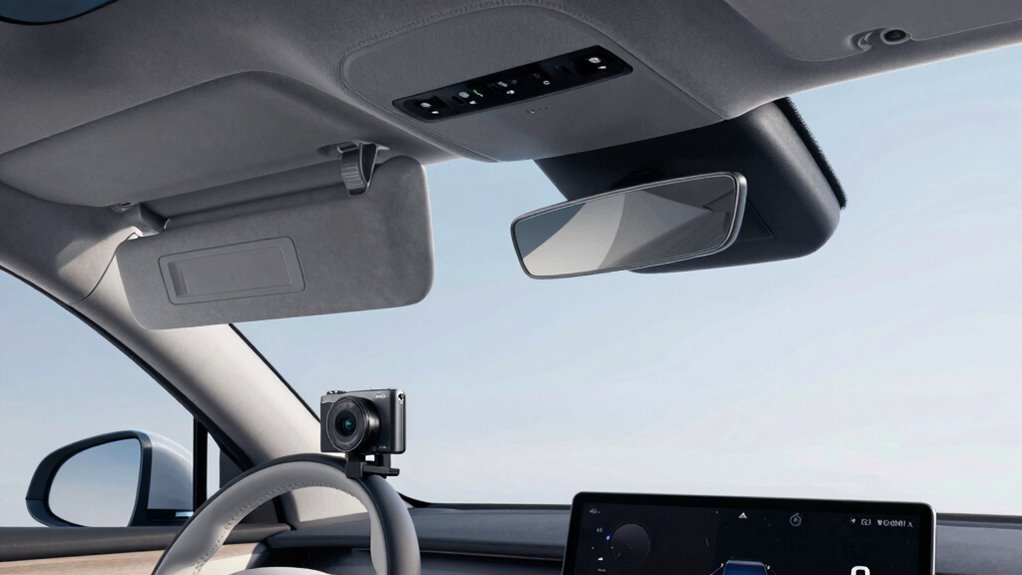
Ever wondered how to install a camera in your vehicle without blocking or interfering with your sun visors? The key is in precise camera positioning. You want your camera to be visible and functional without hindering your sun visor clearance. To start, think about where you plan to mount the camera. Ideally, it should be placed in a location that offers a clear view of the road while staying out of the way of your sun visors when they’re flipped down. This often means mounting it slightly above or behind your rearview mirror—somewhere close enough for good visibility but far enough to avoid contact with the visors.
Position your camera above or behind the rearview mirror for clear view and sun visor clearance.
When choosing the exact spot, be mindful of the angle at which the camera faces the road. It should be tilted just enough to capture the necessary footage without requiring you to lower your visor excessively. Keep in mind that your sun visors are designed to provide shade and block sunlight, so if the camera blocks their movement or presses against them, you risk damaging either the visor or the camera. Proper camera positioning ensures that both can coexist without interference.
Next, check the sun visor clearance after mounting the camera. Once installed, flip your sun visors down and up several times to test their movement. If you notice any resistance or if the visors don’t fully move, adjust the camera’s position slightly. Sometimes, a small change in height or angle makes a big difference. Use mounting brackets or adhesive mounts that allow for easy adjustments, so you can fine-tune the placement as needed. Additionally, considering proper cable management can help prevent accidental tugging or obstruction.
It’s also helpful to think about the cable routing during the installation. Keep the wires tucked away along the edges of the windshield or inside the headliner to prevent them from hanging loosely and interfering with sun visor movement. This not only protects your wiring but also maintains a clean look inside your vehicle. Secure the cables firmly but gently, ensuring they don’t pull or tug on the camera or visor when you operate them.
Finally, test everything thoroughly. After mounting, operate your sun visors repeatedly and check the camera’s view to confirm it remains unobstructed. Adjust the camera’s angle or position if necessary, and ensure that the installation doesn’t compromise either your visibility or the functionality of your sun visors. Properly positioning your camera with sun visor clearance in mind will help prevent accidental damage and ensure both work seamlessly together. With careful camera positioning and attention to sun visor clearance, you’ll have a setup that works seamlessly, providing a good view without sacrificing the convenience and safety your visors offer.
As an affiliate, we earn on qualifying purchases.
Frequently Asked Questions
Will Mounting a Camera Damage My Car’s Interior?
Mounting a camera properly won’t damage your car’s interior if you focus on maintaining interior aesthetics and mounting durability. Use appropriate adhesives or mounts designed for automotive use, ensuring they don’t peel or leave residue. Avoid excessive force, which could damage surfaces, and select discreet mounting spots. When done right, your camera stays secure without harming your interior, keeping your car’s look intact and ensuring long-term durability.
What Types of Mounts Are Best for Sun Visor Compatibility?
Swivel mounts are your best option for sun visor compatibility because they allow flexible positioning without interfering with the visor’s movement. You should look for a camera adhesive that’s strong yet removable, preventing damage to your interior. These mounts attach securely to the visor or dashboard and pivot smoothly, ensuring your camera stays in place while still letting your sun visors function properly. Opt for high-quality, compatible swivel mounts for the best results.
Can I Remove the Camera Easily Without Leaving Marks?
Think of your car’s interior as a delicate dance—removing the camera isn’t a permanent break. You can gently peel off the camera adhesive, knowing it won’t damage your sun visor’s durability. With patience, the camera comes off cleanly, leaving no marks behind. This way, your sun visor remains intact and functional, ready to serve its purpose, while you enjoy the flexibility of your camera setup without worry.
How Does Camera Placement Affect Visibility and Safety?
Your camera placement impacts visibility and safety by influencing camera angles and potential visibility obstruction. Position it where it offers a suitable view without blocking your line of sight or sun visors. Avoid placing it too high or low, which could distort camera angles or cause visibility obstruction. Proper placement ensures you can monitor effectively while maintaining safe driving conditions, preventing distractions or blind spots that compromise safety.
Are There Legal Restrictions on Mounting Cameras on Sun Visors?
Yes, there are legal restrictions on mounting cameras on sun visors. Laws vary by location, but generally, you must make sure your camera doesn’t obstruct your view or violate privacy rights. Privacy concerns are critical, so avoid recording others without consent. Check local regulations before installation to stay compliant. By doing so, you protect yourself from legal issues and respect others’ privacy while still capturing footage effectively.
As an affiliate, we earn on qualifying purchases.
Conclusion
By carefully positioning your camera, you’re like a skilled pilot steering through clear skies—keeping your sun visors free to do their job while capturing the perfect shot. Remember, a little patience and precise placement go a long way. With the right approach, your camera will blend seamlessly into your car’s interior, allowing you to enjoy both safety and style. So go ahead, set it up right, and let your journey be smooth as a well-oiled engine.
vehicle camera with cable management
As an affiliate, we earn on qualifying purchases.
As an affiliate, we earn on qualifying purchases.
sun visor compatible camera mount
As an affiliate, we earn on qualifying purchases.
As an affiliate, we earn on qualifying purchases.
Fall Picks
fall essentials
As an affiliate, we earn on qualifying purchases.